2026 Buyer's Guide to Field Service Management Software
Evaluating field service management software in 2026? See what to look for, where legacy tools fall short, and what real-time execution looks like.
- Field Service Management
Buying FSM software in 2026 is harder than it should be. Most of the tools on the market still trace back to a category that was built for break-fix work, a technician driving to a customer's house, fixing one thing, leaving.
That picture does not match what field operations look like in oil and gas, equipment rental, or energy services, where crews, assets, and jobs are all moving at the same time, and a single mistake on a work order can cost a full day of revenue.
Most field service management software pretends that the gap does not exist. It does. And it is the reason the tool you bought two years ago already feels thin in places it should not.
Why Field Service Management Looks Different In 2026?
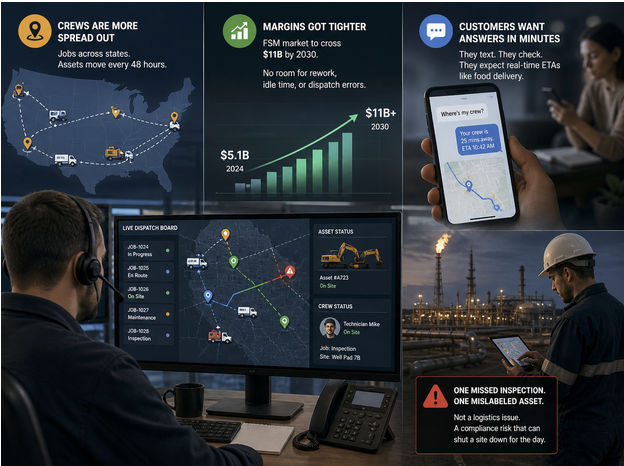
Three shifts broke the old playbook.
Crews are more spread out: A single rental company might run jobs across four states in a week, with assets bouncing between sites every 48 hours. The old idea of a tidy daily route barely applies anymore.
Margins got tighter: Verified Market Research pegged the global FSM market at around $5.1 billion in 2024 and projects it to cross $11 billion by 2030, fueled by companies that cannot afford the rework, idle hours, and dispatch errors that used to get absorbed silently.
Customers want answers in minutes: They text the rep, check the portal, and expect the crew ETA the way they track a food delivery. If your software cannot give a dispatcher live status, the customer call becomes a guessing game.
This pressure shows up sharpest in asset-heavy work. Companies running oil and gas software deal with remote sites that are unforgiving when paperwork is off. One missed inspection or one mislabeled asset, stops being a logistics issue and becomes a compliance risk that can shut a site down for the day.
Where Most FSM Tools Quietly Fall Short?
Ops leaders are not unhappy with their FSM tool because it is broken. They are unhappy because it stops where the actual work begins. The most common gaps:

Work orders trapped in PDFs: Someone prints, scribbles, takes photos, and emails. The data sits for two days before hitting the system. Moving to a digital work order flow that updates from the field in real time fixes most of this, but legacy tools were not built that way.
Asset and crew data in separate systems: Your FSM knows the technician schedule. Your asset tracker knows where the equipment is. Neither knows both, so the dispatcher does the math in their head.
No real offline mode: Crews at a remote site lose signal, the app stops syncing, and the form vanishes. They redo it from memory, or skip the step, and the audit trail has a hole in it.
Reporting only looks backward: You find out about the bottleneck on Monday morning when the weekly report runs. By then, the bad pattern had repeated for five days.
Did You Know? 73% of workers say their most critical data lives in disconnected systems, slowing decisions and increasing operational friction. The tool is in place. The workflow never connected.
What To Actually Look For When Evaluating Field Service Management Software?
Forget the long feature comparison spreadsheets for a minute. Here's what actually changes how your operation runs.
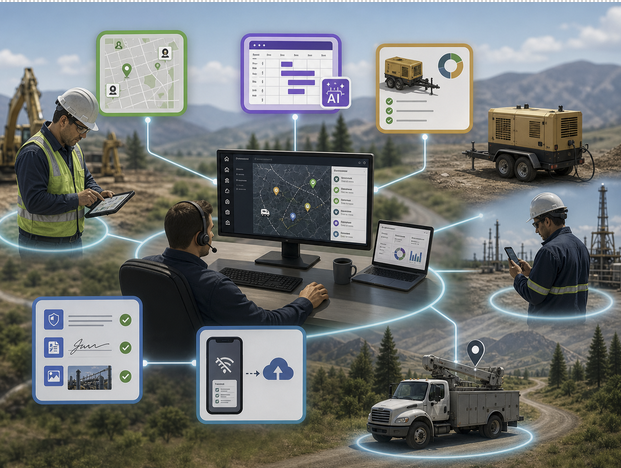
Real-time crew and asset visibility: Open the dashboard and see where every crew is, what asset they have, and what status the job is in, without calling anyone. If the tool refreshes once an hour, that is not real-time.
Mobile-first work execution: The technician's phone is the primary interface, not a watered-down version of the desktop tool. Updating job status, capturing photos, signing off, and adding notes should feel like sending a text. Friction has to be near zero.
Integration with asset and inventory data: Your field service management solution should know what equipment is where, what condition it is in, and when it is due for service. Without that data live, your dispatcher is flying blind, just with a fancier dashboard.
Strong audit and compliance trails: Every action timestamped, every form version saved, every signature captured. In regulated industries, this is the difference between passing an audit and explaining yourself for hours.
AI-assisted scheduling: McKinsey's 2025 research on field service found that a leading water treatment company saw a 40% increase in technician capacity after adopting a digital scheduling solution, alongside a 6% reduction in overtime. The tool should be doing the assignment logic, not your dispatcher.
Offline-first design: The crew at a wellsite does not have LTE all day. The form has to work without it and sync cleanly when the signal comes back.
Pro Tip: When you demo a tool, ask the rep to show you exactly what the technician's phone screen looks like during a real job. If the answer is a polished slide deck, you have your answer.
The Shift From Scheduling Software To Real-Time Execution
Old FSM was a system of record. The technician finished the job, came back to the office, filled out the form, and the system was updated. The dashboard showed yesterday.
New FSM has to be a system of coordination. A crew finishes a job in Midland, the dispatcher sees it instantly, the next ticket pings the truck, the asset gets reassigned, and the customer gets a notification. All of this happens in the time it used to take someone to refresh a spreadsheet.
This sounds small. It is not.
A 2025 IDC forecast on field service technology ranked real-time execution capabilities as one of the top spend priorities for asset-heavy operators through 2027. Companies are not buying scheduling software anymore. They are buying coordination layers that work as the day actually unfolds, where dispatch decisions get made on the fly.
The cost of delay compounds. A 30-minute lag in knowing a crew finished early means the next job starts 30 minutes late, the asset sits idle, and the customer waits longer. Multiply that across a hundred jobs a week, and the leak shows up in the P&L.
How Equipt.ai Approaches Field Execution Differently?
Here's the honest version of why we built this. When we looked at why operations teams kept layering tools on top of each other, the pattern was clear. The FSM tool ran scheduling, a separate platform tracked assets, a spreadsheet handled crew shifts, and a messaging app filled the gaps between them. None of it talked to anything else. Equipt.ai exists because stitching together is where most of the leakage happens.
The point is not to replace every tool you already have. It is to put the field crew, the asset, and the work order on the same screen, in real time, with the dispatcher seeing it as it changes. A crew update changes the asset record, an asset move reshapes the schedule, and a closed work order kicks off billing automatically.
For rental-heavy operations, the asset side matters even more. Equipt.ai, as an equipment rental management software, connects fleet utilization with crew assignments, so equipment is never sitting at a yard while a crew is waiting for it 80 miles away.
What teams report after switching:
Dispatchers stop chasing updates over WhatsApp and phone calls
Crews stop redoing paperwork that synced wrong the first time
Asset utilization climbs because nothing sits idle by accident
Month-end forecasting actually matches what happened in the field
The Friday Afternoon Test
Most FSM rollouts that fail did not fail at the demo. They failed at the 4 pm Friday scenario, when three crews are running late, two assets are in the wrong yard, and a customer is on hold for the third time that week. That is the moment your tool either earns its license fee or quietly costs you the renewal.
When you evaluate the most suitable field service management software for 2026, run every shortlist through that test. The polished happy-path demo does not matter. The Friday afternoon mess does. Equipt.ai was built around that exact scenario.
Book a 30-minute call and bring a real scenario from your last bad week. We will walk through exactly how it would have played out in Equipt.ai, and see exactly where your current setup is leaking before you buy anything!
Frequently Asked Questions
What Is Field Service Management Software In 2026?
It is software that coordinates field crews, work orders, and assets in real time, not just on a schedule. The 2026 version is mobile-first, offline-capable, and connected to live asset data. It helps dispatchers see what is happening, helps technicians do work without paperwork friction, and helps leaders catch problems on the day they happen, not the week after.
How Is Field Service Management Different From Work Order Management?
Work order management is one piece of FSM. It tracks the individual ticket, the steps to complete it, and the close-out. FSM is the broader system that includes scheduling crews, dispatching the right asset, tracking technician location, handling customer communication, and tying it all back to billing. If work order management is the document, FSM is the whole flow around it.
What Industries Need Field Service Management Software The Most?
Asset-heavy and field-driven industries see the biggest impact. Oil and gas, energy services, equipment rental, construction, utilities, HVAC, telecom, and industrial maintenance all run on coordinating crews, equipment, and locations every day. Any operation where a wrong dispatch or a misplaced asset costs real money tends to need FSM. The more remote the work and the larger the fleet, the higher the return.
How Long Does It Take To Implement A Field Service Management Solution?
A typical implementation runs anywhere from 4 to 12 weeks, depending on how messy your current data is and how many integrations you need. Smaller teams with clean asset records can be live in a month. Larger operations with multiple existing systems usually need 8 to 12 weeks. The deciding factor is rarely the software itself. It is data migration and user training.