Digital Work Orders: How Field Teams Actually Get Work Done in 2026
Equipt.ai's digital work orders eliminate this chaos. Technicians receive complete job packets on their phones in seconds, featuring offline access, real-time collaboration, and automatic compliance logging.
- Field Service Management

Most field teams aren’t slow because the crews are slow. They’re slow because the information about each job is spread across paper tickets, WhatsApp threads, a half-updated CRM, and a couple of spreadsheets nobody trusts. Work still gets done, but nobody can prove what happened for two weeks.
A digital work order fixes that one specific problem. The job ticket lives on a phone instead of a clipboard, dispatch sees updates as the tech works, and the back office gets what it needs the moment the job closes. That’s the whole pitch.
Here’s what the rest of this piece covers: what digital work orders actually are, where they make a real difference (field service, equipment rental, oil and gas, plant maintenance), and what shifts when you stop running jobs on paper and chat.
Overview:
A digital work order is a job ticket that lives on a phone or tablet, syncs with dispatch, and updates automatically as work happens.
It replaces paper forms, WhatsApp updates, ad-hoc spreadsheets, and the back-and-forth phone calls that eat half a tech’s day.
Teams using mobile-first work order tools report 20–30% gains in technician utilization, plus faster invoicing and cleaner audit trails.
Best fit: field service, equipment rental, oilfield ops, plant maintenance, anyone with crews moving between jobs.
Equipt.ai brings work orders, dispatch, asset readiness, field updates, docs, and billing under one roof so jobs close on the same day they finish.
What Is a Digital Work Order, Really?
It’s the same job ticket your team has always used. What’s on it, who’s doing it, on which asset, when, and what they found. The only difference is that it lives in software instead of on a clipboard, so the information doesn’t get lost between the truck and the office.
In practice, here’s what that changes for the people doing the work:
The tech opens an app and sees the full job: customer, location, asset history, parts, safety steps, and photos from the last visit.
Status updates happen as work happens, not at the end of the day from a parking lot.
Photos, signatures, meter readings, and notes are attached to the ticket on the spot.
When the job closes, the back office sees it right away, so invoicing goes out the same day instead of next week.
Why Paper, WhatsApp, and Spreadsheets Are Bleeding You Dry?
Most teams don’t realize how much money they leave on the floor until they stop and add it up. A recent industry roundup put it bluntly. Around 75% of field service companies using mobility tech see a measurable jump in productivity, and the global field service management market is on track to hit USD 9.17 billion by 2030 largely because of this shift. The numbers move because the old way quietly burns money in places nobody’s watching.
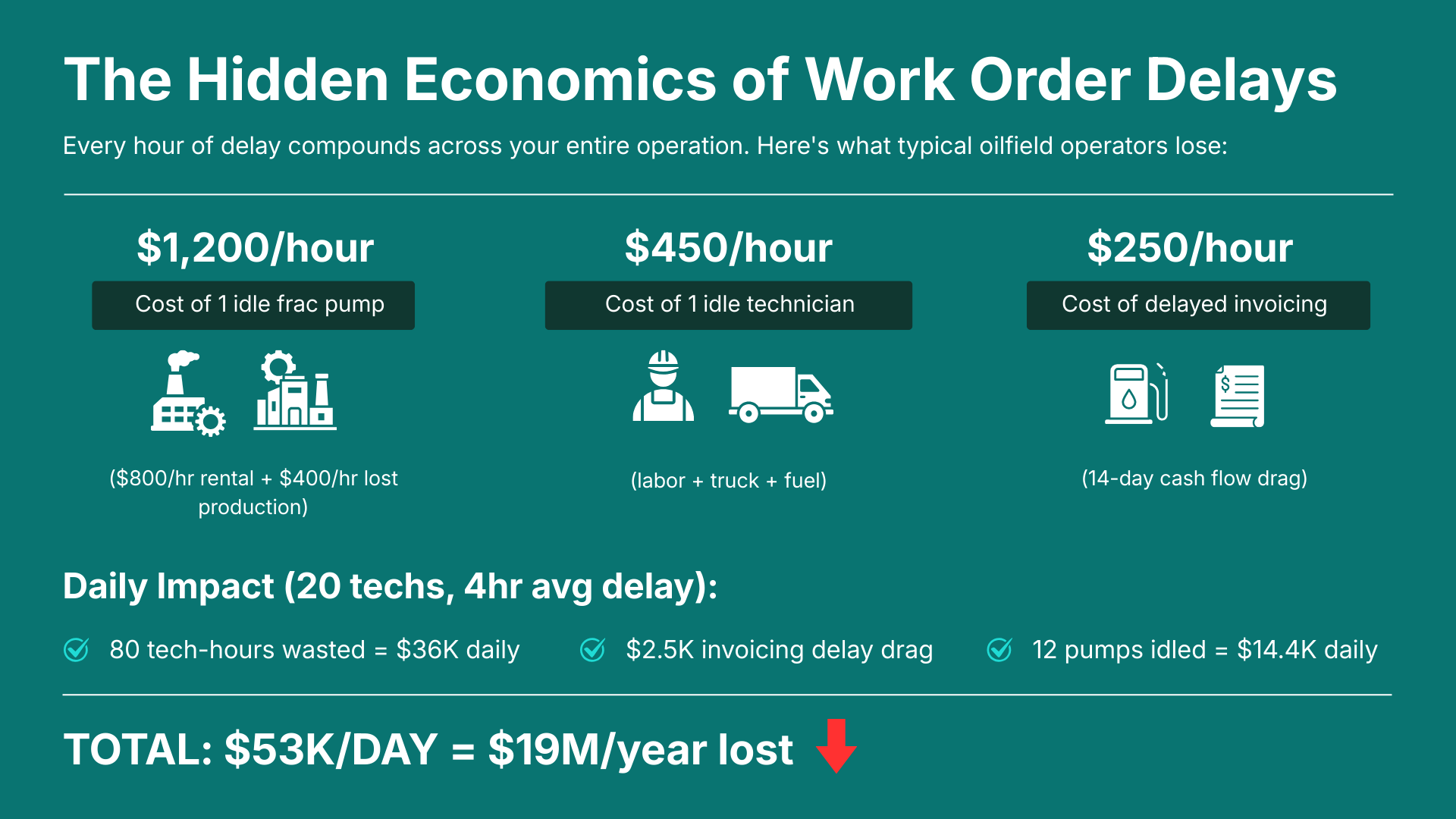
Where it actually leaks:
Dispatch chaos: Calls, texts, sticky notes. Two techs are assigned to the same job. One drives 90 minutes when a closer crew is free.
Bad info on the site: Techs roll up missing the right serial number, the SLA, or the last service note. They burn 30–60 minutes on the phone before any wrench turns.
Lost paperwork: A ticket sits in a glovebox for nine days. Accounts can’t bill what they can’t read.
Compliance scrambles: Auditor asks for last quarter’s safety checks. Half are in someone’s notebook. The rest was a photo on a phone that got wiped.
A two-hour job balloons to six. Across fifty technicians, that compounds into a number that would make any CFO wince.
Tired of chasing tickets across five tools?
See how one screen handles dispatch, field updates, and billing.
Book a 20-minute walk through
How Digital Work Orders Actually Work, Start to Finish?
The lifecycle of a digital work order is the same as the paper version. What changes is the friction at each step. Here’s how it plays out on a real day.
1. Job Assignment That Doesn’t Need a Phone Call
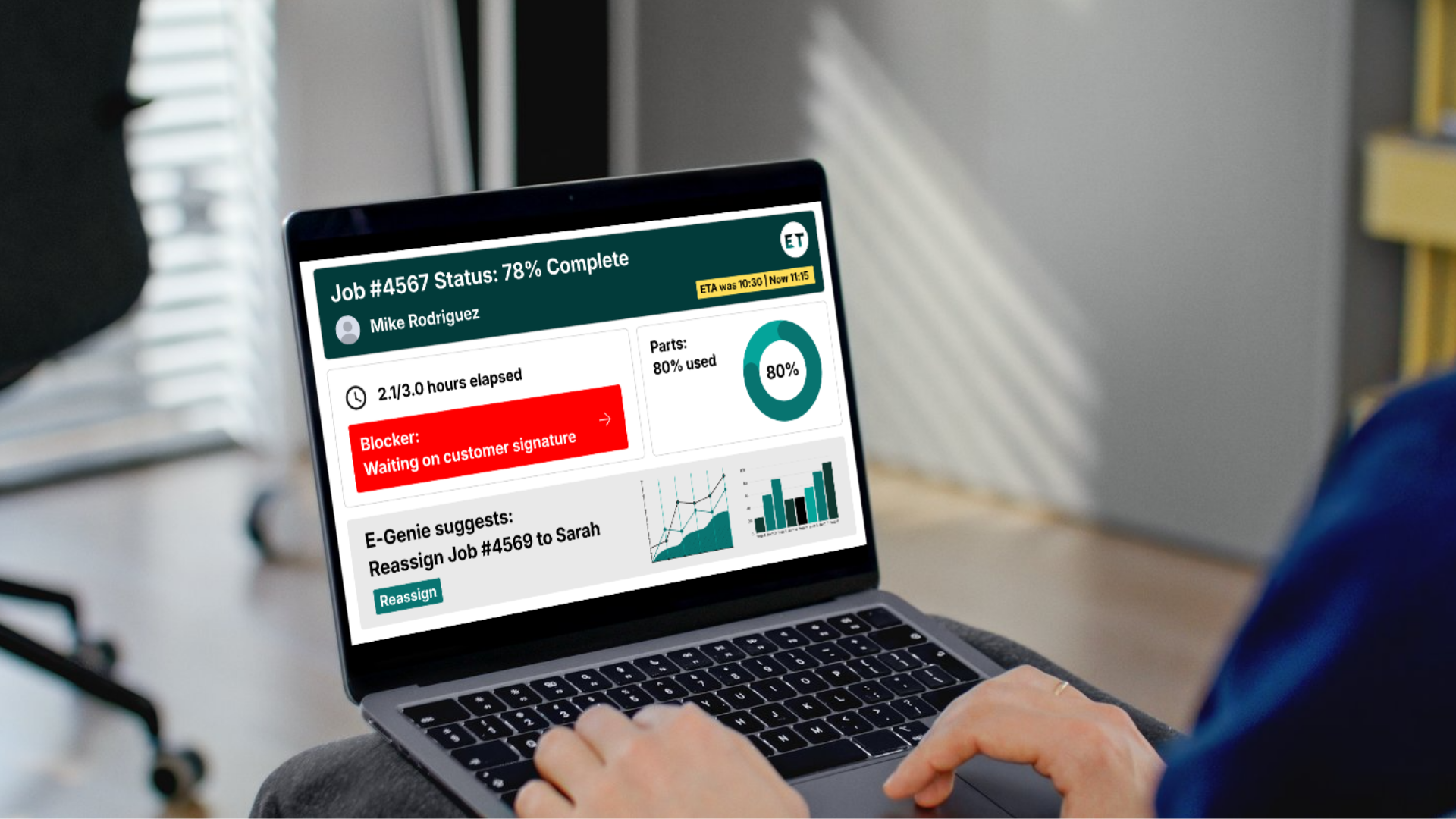
When a new job needs assigning, the platform checks who’s free, who has the right skills, who’s closest, and what gear is already loaded on their truck. It then sends the full ticket to that tech’s phone. Dispatch picks the right person without making five calls to track everyone down, and the tech walks in with the context already in hand.
2. Real-Time Technician Updates From the Field
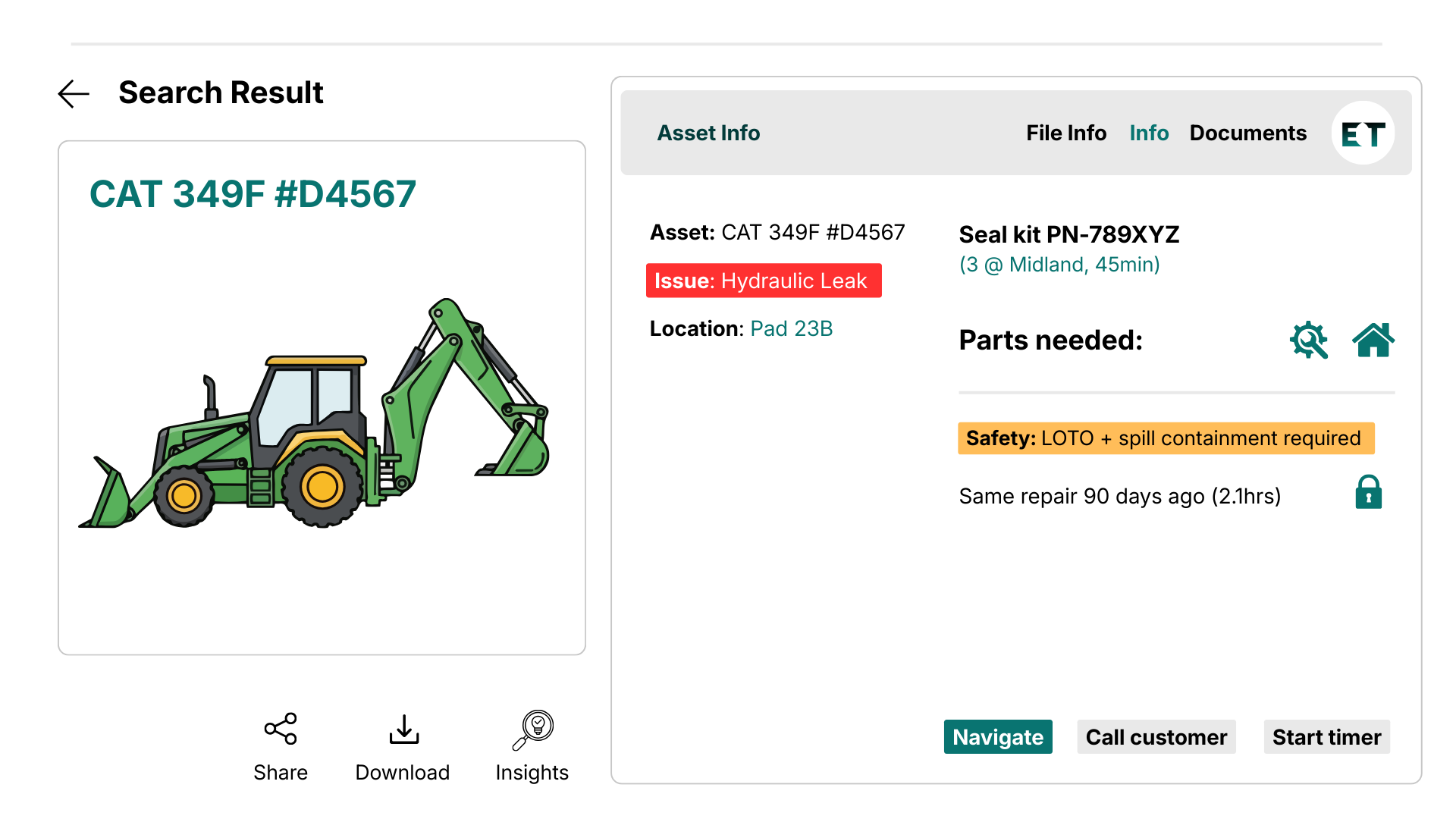
Once the tech accepts the job, everything they need sits on one screen: the asset, its history, prior issues, part numbers, and the safety steps. They tap to update status as work progresses, and dispatch sees it as it happens. Customers can be looped in automatically, which usually cuts the "where’s Mike?" calls down to almost zero.
And when the job is in a dead zone? A good app keeps working offline. The tech keeps logging photos, parts, signatures, all of it. When connectivity comes back, it syncs. Oilfield crews working pads in the Permian, marine techs offshore, pipeline ROW work in the middle of nowhere. None of that breaks the flow.
3. Asset Tracking That Stays Honest
Every action on the work order updates the asset record. The pump that just got serviced now shows runtime hours, the new part, the photos, and the next due date. So when the same unit shows up in another job two months later, the tech walks in already knowing what was done. For asset-heavy operations like upstream oil and gas, this is the difference between predictive maintenance and reactive panic. If that’s your world, our deep dive on asset tracking oil and gas goes into how to set this up without ripping out your ERP.
4. Documentation You Don’t Have to Chase
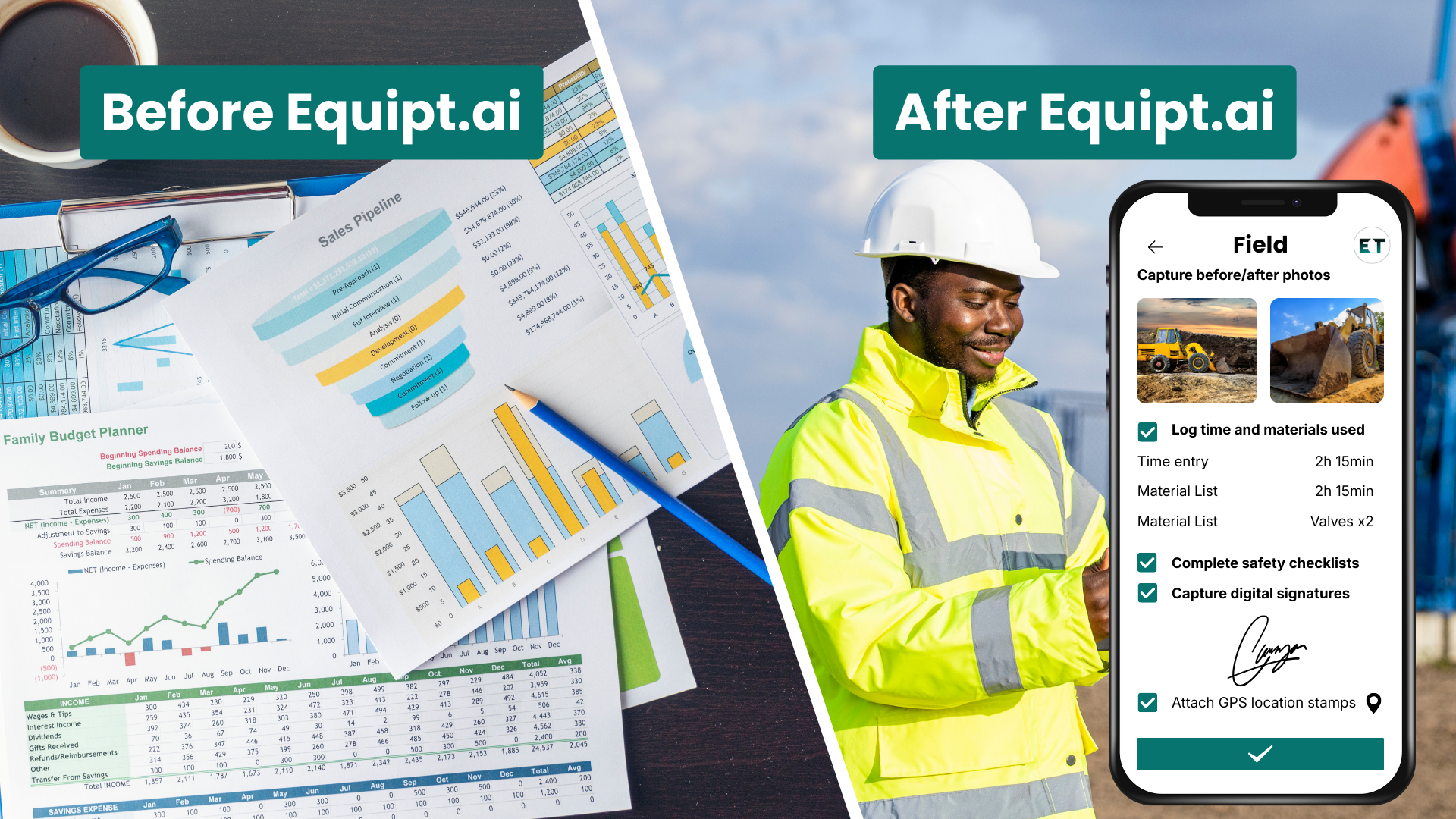
Photos, checklists, customer signatures, safety logs, NORM readings. All of it gets captured on the device as the job happens and attaches to the ticket. The back office stops chasing techs for missing forms, and auditors get a complete trail in two clicks.
5. Approvals Without the Email Chain
Scope changed mid-job? Customer wants to add work? The tech submits the change from the field, a manager or the customer approves on their phone, and the ticket updates. No PDFs going back and forth. No "I never agreed to that" disputes at billing time.
6. Closeout That Triggers Billing the Same Day
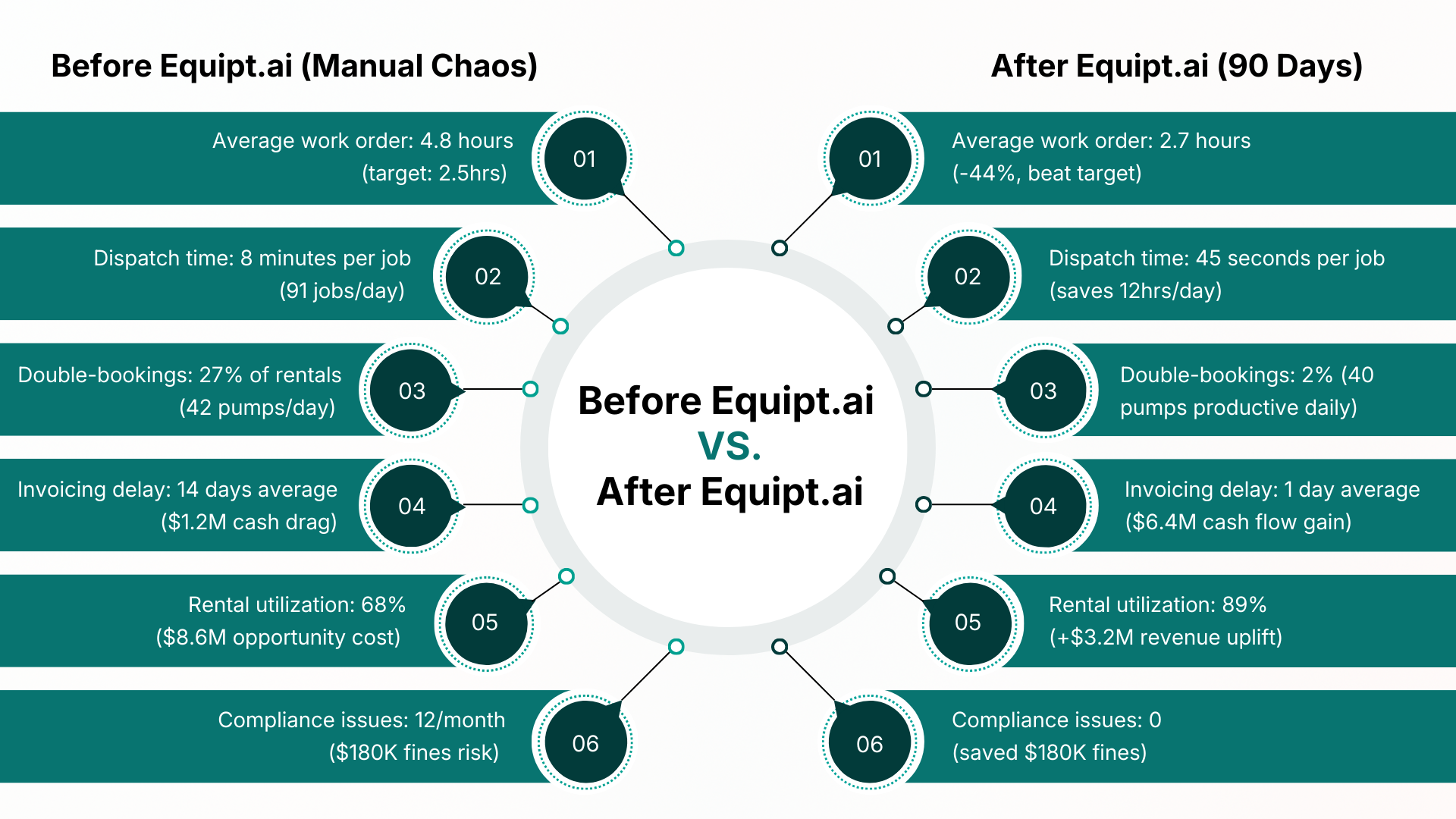
When the tech marks the job complete, the asset record updates, the compliance log files themselves, and the billing data flows to accounts at the same time. What used to take 14 days takes a few hours, and cash flow stops sitting in someone’s inbox.
Where Digital Work Orders Pay Off Fastest?
Not every industry has the same pain. The teams that see the biggest wins usually share a few traits: crews that move between sites, assets that matter, and back offices drowning in reconciliation work.
Field Service
HVAC, electrical, telecom, water, anything with techs in vans. The first-time fix rate climbs the moment techs walk in with full context. If you’re evaluating tools, the breakdown in our field service management software guide compares what to actually look for vs. what vendors love to brag about.
Equipment Rental
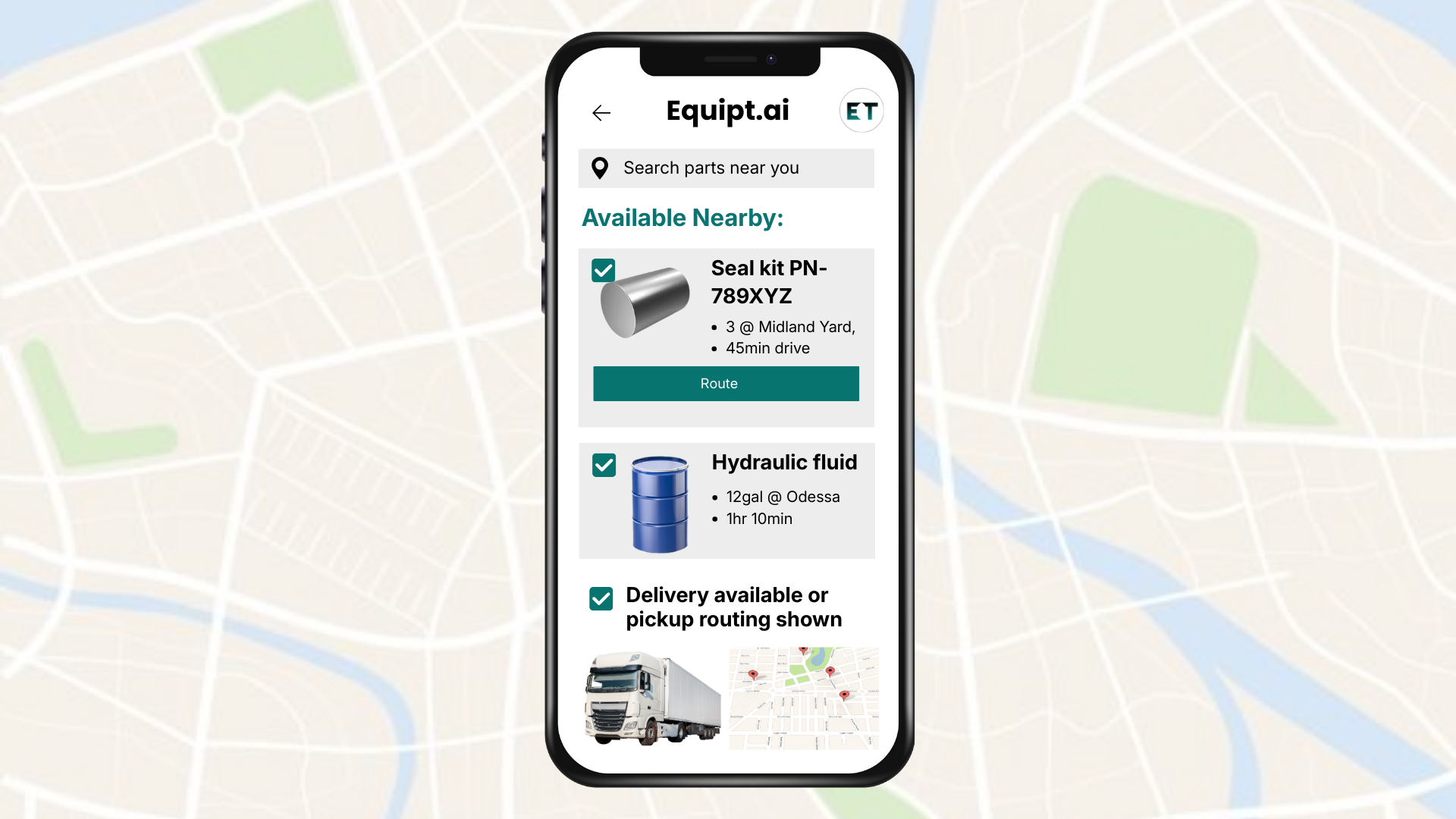
Rental yards live and die by utilization. A unit sitting in a yard with an unclear inspection status is dead inventory. Digital work orders tie the inspection, the service history, and the rental status together so dispatch knows what’s actually ready to go out.
Maintenance and Industrial Operations
Plant maintenance teams running preventive schedules on hundreds of assets can’t do it on paper anymore. The volume kills them. A digital ticket triggered by runtime hours, with the right checklist already loaded, removes the guesswork.
Oil and Gas
Frac spreads, drilling, midstream. Work happens in places where connectivity comes and goes, and the cost of a mistake is high. This is also where coordination across crews, contractors, and operators matters most. Teams using a real oil and gas collaboration tool tend to close the loop between field execution and ERP faster than competitors who still pass PDFs around.
Pulling It All Onto One Screen
A digital work order on its own is useful. But a work order disconnected from dispatch, asset records, and billing is just a fancier paper form. The reason most teams stall on this transition is that they buy a work order app, then a separate dispatch tool, then a separate billing add-on, and end up with the same fragmentation in shinier wrappers.
Equipt.ai is built to keep the whole job on one screen.
Dispatch and assignment. Jobs route to the right tech based on skills, location, and gear on the truck. No spreadsheet juggling.
Asset readiness. Every unit in the yard or on a job carries its service history, inspection status, and next due date.
Field updates. Techs work the ticket from a phone, online, or offline, and dispatch sees it live.
Documentation. Photos, signatures, safety logs, and customer approvals are all attached to the ticket and are audit-ready.
Billing workflow. When the tech closes the job, the data hits accounts. Same-day invoicing becomes the norm.
If your business runs rental fleets specifically, we’ve broken down how the workflow shifts for yards and asset-heavy operations in our equipment rental management software guide. Worth a read before you scope a rollout.
Want to see your own workflow on one screen?
Bring a real job. We’ll show what a closed-loop ticket looks like. Book a demo →
What a Smooth Rollout Looks Like?
Plenty of teams have tried this and stalled. Here’s the pattern that works.
Start with one workflow. Pick one job type. Get it clean in the new system before adding more.
Get the techs in early. If the people in the field hate the app, the rollout dies. Their feedback in week one matters more than any executive presentation.
Kill the parallel paper. If techs still fill out a paper form "just in case," nothing changes. Cut it off by week three.
Connect billing fast. The fastest way to prove ROI is the day finance sees invoices going out the same day a job closes.
Where That Leaves You
Digital work orders aren’t a magic upgrade. They’re a way to stop losing the small information at every handoff. The kind of loss that doesn’t show up on any one report but bleeds out across the year. Teams that move on this first usually pull ahead on utilization, cash flow, and customer trust, and they don’t go back.
FAQs
What Is a Digital Work Order?
A digital work order is a job ticket that lives in software instead of on paper. It tells a technician what needs doing, on which asset, where, and when, and it updates in real time as the job moves from assigned to completed. Everything attached to the job, photos, signatures, parts, safety checks, all of it stays on the ticket for the back office and any future audit.
How Is a Digital Work Order Different From a Paper Work Order?
A paperwork order is a snapshot. Once it leaves the office, you don’t know what’s happening until it comes back, often days later, sometimes incomplete. A digital work order updates live, syncs with dispatch and billing, captures media and signatures on the spot, and never gets lost in a glovebox.
Do Digital Work Orders Work Without Internet?
Yes, if the platform is built for it. Good systems run fully offline and sync the moment the device reconnects. This matters for oilfield, marine, mining, and remote utility crews, where dead zones are the norm.
How Long Does It Take to Roll Out Digital Work Orders?
For a focused pilot on one workflow, two to four weeks is realistic. Full deployment across a 50–150-person field team usually lands in 6 to 10 weeks if the parallel paper systems are actually retired and the techs are looped in early.
What Should a Digital Work Order Include?
At a minimum: job ID, customer and site info, asset details and history, scope of work, parts needed, assigned tech, status, safety steps, photos, signatures, and time stamps. Anything less and you’ll find yourself rebuilding it manually at billing time.
Are Digital Work Orders Worth It for Small Teams?
Yes, often more than for large teams. A 10-person crew loses more proportionally to paperwork delays because there’s no admin slack to absorb it. Many small operators see payback within a quarter once invoicing speeds up.
What Industries Use Digital Work Orders the Most?
Field service, equipment rental, oil and gas, utilities, manufacturing maintenance, telecom, HVAC, and any operation with technicians moving between job sites and assets that need ongoing attention.